Getting the Most from the Coeur De Maman A403 Heart Design for Your Creative Projects
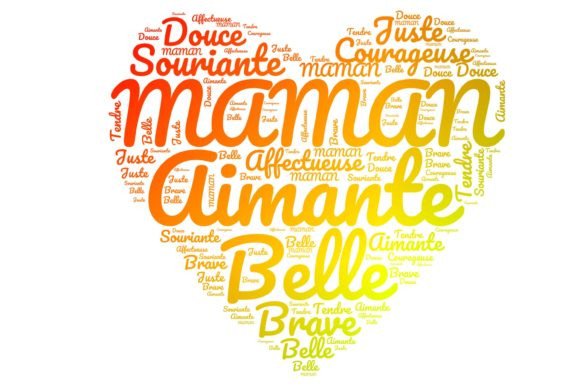
When you come across a digital graphic like Coeur De Maman A403, you are looking at more than just a pink and red heart. It is a carefully built piece of art—the word MAMAN sculpted into the shape of a heart, set on a transparent background, saved at 2100 by 1950 pixels in crisp 300 dpi resolution. For scrapbookers, stationery designers, small business owners crafting Mother’s Day cards, or anyone who loves French-inspired typography, it promises instant elegance. But just downloading and dropping it onto a canvas rarely gives you the results you expect. Many people overlook simple details that can turn a beautiful design into a blurry mess, a licensing headache, or a print disaster.
This file is not a standard clip art image. It arrives as a high‑resolution PNG with an alpha channel—meaning the background is genuinely see‑through, letting you layer the “MAMAN” heart over any texture, photo, or color. The French word for “mom” adds an emotional pull, making it perfect for heirloom‑quality greeting cards, blog banners, or fabric prints. Yet even with those strengths, I’ve watched skilled artisans make avoidable blunders. The next few sections walk through the most frequent missteps and how to handle this asset so your final work actually looks professional.
Why the Coeur De Maman A403 Attracts So Many Creators
Before troubleshooting, it helps to understand why this specific graphic gets added to so many art and craft libraries. The heart silhouette formed by the letters feels both modern and timeless. You can use it as a centerpiece on an invitation for fête des mères, a warm touch on a CD cover for a recorded family message, or a subtle watermark on a blog banner. Because the background is genuinely transparent, you avoid the harsh white box that ruins layered designs. The pixel dimensions (2100 x 1950) give you plenty of room to work with at 300 dpi: at that resolution, the image can print roughly 7 inches wide without any software interpolation, which covers most greeting cards, scrapbook pages, and small posters.
That said, people often treat the file as if it has unlimited flexibility, and that leads to frustration. Let’s look at where things go wrong.
Assuming Every Transparent PNG Is Automatically Print‑Ready
One of the biggest misunderstandings I see is the assumption that a 300 dpi label guarantees sharp output. DPI inside a digital file is just metadata—a suggestion. What matters are the actual pixel dimensions. The Coeur De Maman A403 gives you 2100 x 1950 pixels, and that truly supports a 300 dpi print up to about 7 inches by 6.5 inches. But if you need the design to fill an A4 sheet or a 12×12 scrapbook page, you will have to enlarge it. Many people simply drag the corner handle in Word or Canva and expect the software to magically add detail that does not exist. The result is a slightly soft, pixelated heart that cheapens the whole project.
To avoid this, decide on your final print size before you start. If you need the heart larger than the native pixel count allows at 300 dpi, do a test print. Sometimes enlarging just 15–20% works without obvious quality loss, especially on textured paper where small flaws hide. If you regularly need giant formats, you might pair the design with vector elements or use it as a smaller focal point instead of a full‑background graphic.
Ignoring the File’s License Terms
This feels like a dry detail, but it trips up everyone from Etsy sellers to hobbyists who want to share their creations. A transparent heart with the word MAMAN is highly marketable. You might want to print it on t‑shirts, sell handmade cards, or incorporate it into a pattern for a fabric line. The problem? Not all digital assets come with commercial rights. Even when they do, the license might limit the number of physical items you can sell or forbid reselling the file as part of another digital pack. I have met crafters who used a similar graphic for a line of Mother’s Day mugs, only to receive a take‑down notice because the original license never allowed physical merchandise.
Before you use Coeur De Maman A403 for anything beyond personal enjoyment, locate the license file or the creator’s terms. Check if you need to credit the artist, if there is a cap on reproductions, and whether digital redistribution—like adding the heart to a set of clip‑art you sell—is off‑limits. Doing this upfront saves you legal stress and keeps your relationship with the design community healthy.
Forgetting That Transparency Requires the Right Software
You download the PNG, open it in a basic photo viewer, and it looks perfect—the checkered background confirms transparency. But when you paste it into Microsoft Word or a simple online editor, the heart suddenly has a white or black box behind it. This happens because not every program respects the alpha channel. That white box will ruin any layered composition, especially on kraft paper or patterned backgrounds.
The correct route is to use software designed to handle transparency natively. Adobe Photoshop, GIMP, Affinity Photo, or even Canva Pro will keep that background clear. In craft‑specific programs like Cricut Design Space or Silhouette Studio, the transparent PNG usually imports well, but always do a quick test by placing it over a colored shape before committing to a large print run. If your tool refuses to cooperate, save the file as a TIFF with transparency, or use a clipping mask to remove the unwanted background—though that’s an extra step you can prevent by choosing the right editor from the start.
Scaling Down Without Caring for File Weight
This is the flip side. While people often enlarge incorrectly, some folks use the full‑resolution file for a tiny thumbnail—say, a 200‑pixel‑wide blog icon. The browser or printer driver then has to downsample a huge image, slowing down loading times and occasionally introducing aliasing artifacts. The Coeur De Maman A403 is a large file for a reason; it is meant for print‑quality output. For digital use, make a dedicated copy resized to your exact needs with bicubic sharper reduction (in Photoshop) or a similar high‑quality algorithm. Keep the original safe, and work with a duplicate. Your website visitors will appreciate the faster load, and your printed invitations will still look stunning because you preserved the master file.
Overlooking Color Profiles and Paper Choice
That warm red and soft pink might glow on your screen, but a home inkjet on uncoated paper can muddle the tones. Many people download digital hearts, print them immediately, and blame the graphic when colors bleed or appear dull. In reality, the file is almost certainly in sRGB, which is fine for screens and many home printers, but if you need a true match for branding or a coordinated suite of stationery, you might convert the image to CMYK and soft‑proof it against a specific paper profile. Even without advanced software, a simple test print on your chosen cardstock reveals whether the red looks too magenta or the heart loses its definition. Adjusting saturation and brightness slightly for your printer can rescue the entire batch.
Practical Steps to Make the MAMAN Heart Shine
Start by opening Coeur De Maman A403 in an editor that supports layers. Place it over a warm cream background or a delicate floral pattern and immediately resize while holding the shift key to constrain proportions. Do not stretch it unequally; a squashed heart instantly looks amateurish. If your project calls for the graphic to sit at the top of an invitation, leave enough breathing room—about 20% of the total card height—so the design doesn’t feel crowded. The script‑like word MAMAN is already ornate; letting it stand against a clean backdrop often works better than stacking it with other strong elements.
When preparing for print, double‑check the output resolution. In Photoshop, go to Image > Image Size and uncheck “Resample.” You’ll see that at 300 dpi the width is exactly 7 inches. If you need it at 5 inches wide, the resolution jumps to 420 dpi, which is fine for most printers. If you need it at 10 inches, the resolution drops to 210 dpi—still acceptable for a large poster viewed from a distance, but not ideal for an intimate card. Let the numbers guide your decision, not guesswork.
Subtle Mistakes That Lower the Craft’s Perceived Value
Beyond the technical details, small aesthetic choices can undermine a project. Some designers apply heavy drop shadows or bevel effects to the heart, thinking it adds dimension. But the letter‑heart silhouette already has a delicate shape; too much effect can make it look cheesy or dated. If you want depth, try a very soft, low‑opacity shadow that lifts the design without screaming “filter.” Similarly, avoid overlaying the heart on a busy photograph where the word MAMAN fights for legibility. The beauty of the transparent PNG is that you can place it over a subtle gradient or a solid pastel and the message remains clear.
Another overlooked aspect is matching the mood. The French MAMAN carries an intimacy that pairs well with vintage papers, soft linen textures, or handwritten fonts. If you combine it with futuristic neon graphics or aggressive typography, the heart loses its charm. Think about who will receive the final piece—likely a mother figure—and choose complementary elements that tell a coherent story.
What to Check Before You Download or Purchase
If you haven’t acquired the file yet, pause long enough to verify a few things. Is the resolution truly 2100 x 1950 pixels at 300 dpi, or is that just the name of the product? Look for a clear description of the pixel count and the presence of a transparent background; some previews overlay the heart on a white canvas, which hides whether the background is really see‑through. Confirm the file format is PNG, not a flattened JPG masquerading as a transparent image. Check the creator’s notes about any color variation between screens and print output—honest sellers will mention it.
If you plan to use the graphic on multiple projects over time, keep an untouched copy in a folder labeled “Originals.” Only edit duplicates. That way, years later, you can still return to the pristine Coeur De Maman A403 for new creations without worrying about accidental resizing or format changes. Small habits like this keep your digital asset library clean and professional.
Bringing It All Together Without the Stress
At its core, this heart design is a practical, emotionally resonant tool for crafters. It doesn’t require expert graphic design skills to use well. The main difference between a project that looks store‑bought and one that falls flat often lies in respecting the file’s resolution boundaries, honoring the license, using transparency‑friendly software, and making intentional design choices. Many people rush straight to printing because the graphic is so pretty, skipping the small checks that would have saved them reams of cardstock and frustration.
Try this approach: next time you work with the Coeur De Maman A403, block out ten minutes to set up your canvas correctly, check the resolution math, and do a one‑inch test print on a corner of your paper. If the heart stays crisp and the transparency holds, you can proceed confidently. If something looks off, go back and adjust the scaling or the color settings before producing twenty copies. That tiny upfront investment of time transforms a decent result into a remarkable one. And when a mother holds that card or unwraps that custom gift, she will notice the clarity and care—not the pixelated edges or the muddy pink that could have been avoided.