What the Option Infographic PowerPoint Template Offers and Where It Fits in Your Presentation Toolkit
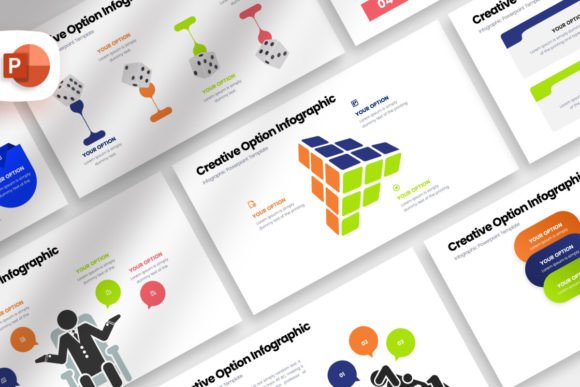
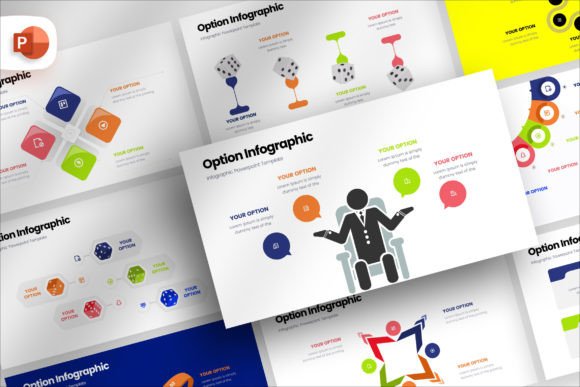
Every presentation creator eventually faces the same question: how do you communicate choices clearly without overwhelming your audience? The Option Infographic PowerPoint Template addresses this directly. It is a structured slide deck built around the visual language of comparison and selection. Rather than starting from a blank canvas, you gain 100 pre-designed slides that frame options, alternatives, and decision paths in a way that audiences can follow with minimal effort. The template uses a 16:9 aspect ratio, which matches most modern displays and projectors, and it centers on editable shapes, drag-and-drop image placeholders, and consistent typography pulled from freely licensed fonts.
What makes this particular resource distinct is not a single flashy feature but a combination of practical design decisions. The shape elements are fully editable in color, size, and position. The image placeholders automatically adjust for size, transparency, and shape without requiring manual cropping or resizing. A mockup device file is included for screen-based presentations, letting you drop a screenshot placeholder into a laptop or phone frame. These details matter when you are assembling a presentation under time pressure, because they reduce the small frictions that accumulate during the design process.
How This Template Compares with Building Slides from Scratch
One natural alternative to using any pre-made template is creating every slide yourself. This path offers complete creative control. You choose every color gradient, every icon style, and every layout nuance. For presentation designers who have strong visual instincts and plenty of time, this can produce outstanding results. However, the tradeoff is significant: building a full 20-slide deck with polished infographics often takes days, not hours. You need to make repeated micro-decisions about alignment, spacing, and consistency that a well-built template has already resolved.
The Option Infographic PowerPoint Template takes a different approach. It provides a foundation that you adapt rather than invent. This shifts your role from designer to curator. You select which slide layouts match your message, insert your data and imagery, and adjust colors to align with your brand. The time savings are substantial, but the tradeoff is that your final output will live within a certain visual language. If that language aligns with your needs, the result feels custom and intentional. If it does not, you may find yourself fighting the template, which defeats the purpose.
Templates Versus Agency Design: Weighing Cost, Control, and Customization
Another option worth considering is hiring a presentation design agency or freelancer. This route delivers something tailored specifically to your content, your audience, and your brand identity. Agencies bring strategic thinking, custom illustration, and motion design if needed. The deliverables can be exceptional. The primary tradeoff is cost and turnaround time. A custom-designed deck can run anywhere from a few hundred to several thousand dollars, depending on complexity, and revisions can stretch timelines.
The template model sits between DIY and fully custom design. With a one-time purchase, you gain access to a broad set of slide options that you can reuse across multiple presentations. This makes the Option Infographic PowerPoint Template particularly relevant for teams and individuals who deliver presentations regularly and need a dependable starting point. You sacrifice some uniqueness, but you gain speed and consistency. For many business contexts—internal strategy reviews, client proposals with standardized branding, training sessions—the tradeoff is well worth it.
Understanding What the Option Infographic Template Does Best
To make a sound decision, it helps to understand exactly where this type of template excels. The name itself hints at its strength: option comparison. If your message involves presenting two or more paths, evaluating pros and cons, showing decision trees, or walking stakeholders through a selection process, the slide structures are purpose-built for that task. You will find layouts designed for side-by-side comparisons, ranking tables, weighted scoring visuals, and branching logic diagrams. These are not generic bullet-point slides—they are built around the cognitive flow of evaluating choices.
Beyond comparison-focused content, the template handles broader infographic needs. Process flows, timeline sequences, and data highlights benefit from the same clean, editable design language. The drag-and-drop image placeholders mean you can incorporate product shots, team photos, or location imagery without disrupting the slide's visual rhythm. The auto-adjustment for size, transparency, and shape is particularly helpful when you are pulling images from different sources that have inconsistent dimensions or color profiles.
Strengths That Emerge in Daily Use
After working with this type of template, several practical advantages become clear. First, the 100-slide library means you rarely need to create a layout from scratch for common presentation scenarios. You can mix and match slides across different decks without worrying about visual inconsistency. Second, the documented font files, offered under a free license, eliminate the headache of missing typefaces or licensing compliance issues. Third, the inclusion of device mockups—where you drop a screen image into a placeholder framed by a laptop, tablet, or phone—saves the extra step of sourcing or building device frames from external tools.
Editing flexibility is another practical strength. Every shape remains editable in PowerPoint, which means you are not locked into the template's original aesthetic. You can recolor elements to match brand guidelines, resize components to fit different amounts of text, or reposition key graphics to suit a different narrative flow. The template behaves like a well-organized toolkit rather than a rigid fill-in-the-blanks exercise.
Tradeoffs and Situations Where You Might Look Elsewhere
No single resource fits every need, and the Option Infographic PowerPoint Template has limitations worth acknowledging. The most notable is that stock images are not included. The product description is explicit on this point: all image stocks are excluded from the package. This means you are responsible for sourcing any photography or illustration that goes beyond the template's built-in graphic elements. For some users, this is a non-issue because they have access to internal image libraries or prefer to use their own visuals. For others who expect a fully populated, ready-to-present deck out of the box, this represents additional work.
Another consideration is presentation context. If your audience expects highly distinctive, avant-garde design—perhaps for a creative pitch or a luxury brand launch—a template built for broad applicability may feel too safe or familiar. In those cases, custom design or a more stylized template might serve you better. Similarly, if your presentation relies heavily on complex animation sequences or embedded interactive elements, you may need to supplement the template with additional motion design work, as the core value here is in static infographic clarity rather than cinematic effects.
Comparing Template Categories: Infographic-Focused Versus General-Purpose Decks
The broader template market splits roughly into two categories: general-purpose corporate decks and specialized infographic collections. General-purpose decks offer a mix of text slides, basic chart slides, and simple image layouts. They are versatile but often lack the detailed comparative structures that make option analysis compelling. Specialized infographic templates, including the Option Infographic PowerPoint Template, invest more heavily in visual storytelling. You get slides that handle multi-variable comparisons, weighted decision matrices, and layered information hierarchies that would take hours to build manually.
If your presentations frequently involve comparing pricing tiers, evaluating vendor proposals, mapping strategic alternatives, or guiding a team through a decision framework, the specialized infographic category offers a better fit. If your needs are more mixed—perhaps a quarterly business review that is 70 percent text and data tables and 30 percent light graphics—a general-purpose deck might be sufficient and simpler to work with.
When the Option Infographic Template Is the Right Choice
Certain scenarios align particularly well with this template's strengths. Consider a product manager who needs to present three feature roadmap options to stakeholders, each with different timelines, resource requirements, and projected outcomes. The side-by-side comparison slides, combined with editable timeline graphics and image placeholders for supporting visuals, allow them to build a coherent narrative in an afternoon rather than over several days.
Similarly, a consultant preparing a vendor selection recommendation for a client benefits from the built-in decision matrix layouts. They can present weighted criteria, scored alternatives, and a clear visual summary without wrestling with alignment or spacing. The mockup device slides are especially useful here if they need to show screenshots of software interfaces being evaluated.
Training and education professionals also find value in this format. When explaining concepts that involve branching logic or multiple pathways—such as career progression options, compliance decision flows, or product selection guides—the template's comparative visuals help learners process information more naturally than dense paragraphs or simple lists.
Factors to Weigh Before Committing
Several practical factors deserve attention as you evaluate whether this template matches your workflow. First, consider your team's skill level with PowerPoint. The template is designed to be easy to edit, but users who are unfamiliar with working inside slide masters, adjusting shape properties, or managing placeholder images may need a short learning period. The included documentation file helps bridge this gap, but it is worth factoring in a modest ramp-up time if you are handing the template to less experienced colleagues.
Second, think about brand consistency across your organization. If you already have a strict corporate template with locked colors, fonts, and layouts, adopting an external infographic template requires a decision about how to integrate the two. You may need to invest time upfront to adapt the template's color palette and typography to match your brand, after which it can be reused across multiple projects. This is a manageable task given the full editability of shapes and the freely licensed fonts, but it is not instantaneous.
Third, assess the volume and frequency of your presentation needs. If you deliver one major presentation per quarter, the efficiency gains of a 100-slide template may be less impactful than for someone who creates two or three decks per month. The value scales with usage. Occasional presenters might find a smaller, more focused template or even a handful of custom-designed slides sufficient for their purposes.
A Broader View of Options for Visual Decision-Making
Beyond individual templates, the approach you take to visual communication shapes your outcomes more than any single resource. Some teams invest in training their members in information design principles, enabling them to build effective comparison visuals from scratch in any tool. Others adopt template libraries that cover multiple presentation scenarios, of which option infographics are one component. Still, others rely on specialized tools like diagramming software for complex decision trees and import the outputs into their presentation tool of choice.
The Option Infographic PowerPoint Template occupies a practical middle ground. It does not require you to master design theory or learn new software. It works within PowerPoint, a tool most professionals already use. It focuses specifically on the visual language of choice and comparison, which means you are not paying for slide types you may never use. Understanding this positioning helps clarify whether it fits your current needs or whether a different path—training, tooling, or more custom resources—would serve you better over time.
Making an Informed Decision for Your Next Presentation
Choosing a presentation resource is ultimately about alignment. The right tool for one team or project may be the wrong one for another. What makes the evaluation process manageable is being clear about what you need: the complexity of your comparison content, the time you have available, the skill level of the people building the slides, and the expectations of your audience. When those factors point toward a structured, adaptable, and visually coherent starting point, a specialized infographic template becomes a practical asset rather than just another purchase.
Take time to review what a given template actually includes beyond the slide count. The presence or absence of image stocks, the editability of core elements, the licensing terms for fonts, and the inclusion of supplementary files like documentation and device mockups all affect the real-world experience of using the product. These details often determine whether a template integrates smoothly into your workflow or creates additional friction. The goal is not to find a perfect resource—none exists—but to find one whose strengths align with your priorities and whose limitations you can work around without significant compromise.