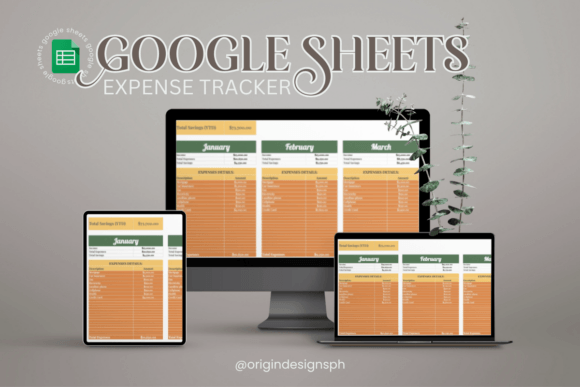
Master Your Money with the 2025 Google Sheets Expense Tracker
The numbers don’t lie—but they also don’t have to intimidate. If you’ve ever stared at a pile of crinkled receipts or scrolled endlessly through a banking app trying to remember what that $26.17 charge was for, you know how quickly financial clarity can slip away. The 2025 Google Sheets Expense Tracker flips that script. It’s not another bloated subscription service or a mobile app that harvests your data. It’s a clean, deceptively simple spreadsheet template that gives you exactly what you need: a place to categorize, track, and visualize every dollar without the noise.
Why Spreadsheets Still Win in 2025
In a world drowning in specialized budgeting apps, you might wonder why a Google Sheets template remains the smarter choice. The answer lies in flexibility and ownership. Unlike rigid software that forces you into predefined spending buckets, a well-designed spreadsheet bends to your life. The 2025 Google Sheets Expense Tracker leverages the full power of Google’s cloud ecosystem—auto-save, cross-device sync, and seamless sharing—while leaving you in complete control. No ads, no upsells, no “premium insights” locked behind a paywall. You log in with your Google account, and everything lives where you want it: in your own Drive, secured by two-factor authentication and your own privacy settings.
For freelancers tracking irregular income, couples combining household finances, or students learning to stretch a stipend, the template offers what apps often miss: backbone. You can tweak formulas, add columns for tax-related expenses, or even link to other sheets for long-term planning. It’s not a black box; it’s a transparent framework that grows with you.
The Simplicity That Changes Everything
Most people don’t fail at budgeting because they lack desire—they fail because the tools are exhausting. That’s where the 2025 Google Sheets Expense Tracker shines. You won’t find fifty tabs of intimidating calculations. Instead, you’re greeted with an intuitive layout that feels almost too easy. Enter the date, pick a category from a dropdown, type the amount, and add a quick note. The sheet handles the rest. It’s the kind of friction-free entry that makes tracking feel like a ten-second ritual, not a Saturday morning chore.
One-Click Categorization for Instant Clarity
Categories aren’t just labels; they’re the lenses through which you see your habits. The template comes pre-loaded with sensible defaults—Groceries, Transport, Dining Out, Utilities, Entertainment—but you can reshape them entirely. If you’re a digital nomad, you might create a Co-Working Space category. Parents could add Childcare or School Supplies. This isn’t a one-size-fits-all solution forced upon you; it’s a starting point that invites personalization. Each expense slips into its logical home, and before you know it, patterns emerge: maybe your afternoon coffee runs cost more than your electric bill. That’s the kind of revelation that sparks change.
Visual Dashboards That Tell a Story
Rows and columns are powerful, but a chart can stop you mid-scroll. The 2025 Google Sheets Expense Tracker includes ready-made visualizations that automatically update as you log entries. Pie charts break down spending by category. A monthly bar chart shows whether you’re drifting upward or finally stabilizing. For visual thinkers, these graphics transform abstract totals into a story you can act on. Did dining out spike in March? That’s probably spring break. Did your grocery spending drop because you started meal-prepping? The chart validates your effort instantly. It’s positive reinforcement built right into your financial routine.
From Scattered Receipts to a Cohesive System
Think about the last time you tried to gather all your expenses for tax season or a loan application. It probably involved digging through email confirmations, crumpled paper receipts, and memory. The 2025 Google Sheets Expense Tracker erases that pain. Because it lives in the cloud, you can pull it up on your phone while standing at the checkout, log an expense in real time, and never worry about losing that slip of paper again. Over a year, that creates a comprehensive, searchable history. Need to know exactly how much you spent on business travel in Q2? Filter the category column and you’ll have your answer in seconds.
What sets this apart from a manual notebook or a basic spreadsheet you might build yourself is the thoughtful structure. It includes subtle but critical features—like conditional formatting that highlights overspending, a running balance that keeps you aware of your checking account reality, and protected formula cells so you don’t accidentally break the math. It’s the kind of foresight that comes from people who’ve made the mistakes already.
Making Informed Decisions Without the Guesswork
There’s a gap between knowing you spent too much and understanding why. The template bridges that by turning raw data into context. Let’s say you suspect subscription creep is eroding your savings. You can filter all expenses tagged as Subscriptions and see not just the total, but the timing. Are you paying for a streaming service you haven’t used in months? Cancel it. Did an annual fee hit unexpectedly? Now you can plan for it next year. The 2025 Google Sheets Expense Tracker doesn’t just record your past; it equips you to forecast and adjust.
This isn’t about guilt-tripping yourself. It’s about gaining the kind of clarity that makes conversations with a partner or financial advisor productive. Instead of saying “I think we spend too much,” you can open the sheet and say “We’ve averaged $850 on dining out for three months—what if we capped it at $600 and redirected the rest to our vacation fund?” That’s the power of precise, accessible data.
A Template Designed for Real Life
Real life is lumpy. Some months bring a car repair; others, a birthday celebration. The 2025 Google Sheets Expense Tracker handles irregular expenses gracefully. You can add a one-time category or use the notes field to flag an unusual purchase. Budgeting purists might insist on rigid monthly allocations, but this template leans pragmatic: capture everything honestly, then analyze. It works for:
- Freelancers and gig workers managing variable income and deductible expenses.
- Students balancing loans, part-time jobs, and social spending.
- Families wanting a shared, transparent view of household cash flow.
- Small business owners who need a light-but-clear expense log without accounting software overhead.
Each group brings different priorities, and the sheet’s simplicity is its superpower. A student doesn’t need advanced investment tracking; a freelancer might want a separate tab for quarterly estimated taxes. The template doesn’t dictate your journey—it illuminates the path you’re already on.
Security, Privacy, and Full Ownership
In an era of data breaches and mysterious algorithmic profiling, where you store your financial information matters. When you use a third-party budgeting app, you’re often granting broad permission to access your transaction history, location, and even contacts. The 2025 Google Sheets Expense Tracker keeps your data where it belongs: in your personal Google account. You decide who can view or edit the sheet. For couples, you can share it with editing access; for an accountant, you can provide view-only during tax season. There’s no intermediary mining your spending patterns to sell you credit cards. This privacy-first approach is a quiet revolution that puts you back in the driver’s seat.
How to Get Started in Less Than Five Minutes
You don’t need to watch a tutorial or read a manual. Once you grab your copy of the 2025 Google Sheets Expense Tracker, you’ll be up and running almost immediately. Open the file in Google Sheets, go to File > Make a Copy (so you have your own editable version), and personalize the month tab. Then:
- Glance at the pre-built categories and adjust them to match your spending reality.
- Start entering expenses from today. Don’t try to backfill six months—that’s a recipe for fatigue. Begin now.
- Check the dashboard tab to see your first chart populate. It’s surprisingly satisfying.
- Bookmark the sheet on your phone’s browser or add it to your home screen for instant access.
From that moment, you’re no longer guessing. You’re building a habit that takes seconds a day and pays off in genuine peace of mind.
The 2025 Edge: Built for the Modern Workflow
Google Sheets continues to evolve, and this template takes advantage of the latest features available in 2025. Smart chips for dates and places, improved mobile responsiveness, and deeper integration with Google Workspace mean you can link expenses to Calendar events or pull data into a Google Doc for a report. Imagine attaching a receipt photo directly in a cell comment for later reference. The environment is dynamic, and the template is designed to leverage these capabilities without requiring you to be a spreadsheet wizard.
Collaboration is another modern necessity. If you share finances with a partner, you can both log into the same sheet simultaneously—no more “Who forgot to tell me about the vet bill?” moments. The version history lets you see who made which change, and the real-time nature eliminates double entries. It’s a small shift that dramatically reduces friction in money conversations.
Stop Wishing for Financial Clarity—Create It
Messy finances don’t fix themselves. They linger, causing low-grade stress that affects sleep, relationships, and career decisions. The 2025 Google Sheets Expense Tracker isn’t a magic wand, but it’s the next best thing: a reliable, transparent tool that meets you exactly where you are. It doesn’t judge a month of overspending. It simply shows you the numbers so you can decide what to do next. Whether you’re saving for a down payment, planning a long-overdue vacation, or just tired of that sinking feeling when you check your bank balance, this tracker gives you the agency to change your trajectory.
Your finances won’t organize themselves. But with this template, they don’t have to be a mess any longer. Grab your copy today and take the first small, powerful step toward a budget that finally makes sense.