Evaluating Havens Feel: A Furniture Mobile App Design for Thoughtful Home Styling
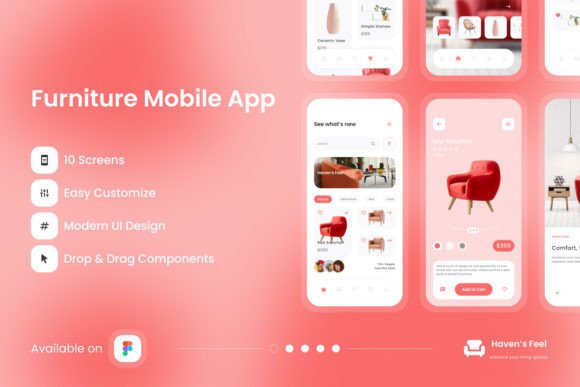
Choosing furniture that reflects personal taste while maintaining functional comfort can feel like an overwhelming process. Digital tools have reshaped how people explore interior design, and a well-structured mobile experience can simplify decisions that once required hours of in-store browsing. The Havens Feel - Furniture Mobile App enters this space as a design resource intended to support a calm and intuitive furniture shopping journey. Rather than simply listing products, the app design emphasizes a serene browsing atmosphere where every visual element works toward helping users imagine pieces in their own living spaces.
This article examines what the Havens Feel design offers, who might benefit from it, and where its strengths and limitations lie. The goal is to provide a balanced view that helps designers, product teams, and business owners determine whether this resource aligns with their project needs.
Understanding the Havens Feel Design Resource
At its core, the Havens Feel - Furniture Mobile App is a Figma-based screen layout package created for mobile furniture retail experiences. It includes a complete set of organized screens, global text and color styles, and a structure built around ease of customization. The design comes as a .fig file, making it directly compatible with Figma, one of the most widely adopted interface design tools available today. Designers who download the file gain access to a pre-built framework that can be adjusted to fit specific brand identities or product catalogs.
The layout promotes a sense of calm through carefully chosen typography, open source fonts, and a clean visual hierarchy. Every layer within the file is well organized and neatly structured, which reduces the time needed to navigate the document and make modifications. For teams working under tight deadlines, this organizational clarity can be a meaningful productivity advantage.
Why Designers and Product Teams Might Consider This Resource
Several practical reasons make the Havens Feel design worth evaluating. First, the high-quality screen layout design provides a polished starting point that can accelerate the initial phases of a mobile app project. Instead of building every screen from scratch, designers can begin with a professionally composed foundation and focus their energy on tailoring the experience to their specific audience.
Second, the design that is easy to adjust offers flexibility across different brand requirements. Colors, typography scales, and component styles are managed through global styles, meaning a single change can propagate throughout the entire file. This consistency mechanism helps maintain visual coherence as the design evolves. For agencies juggling multiple client projects, this adaptability can translate into significant efficiency gains over time.
Third, the reliance on open source fonts removes licensing concerns that sometimes accompany premium typefaces. Teams can use the fonts freely, modify them if necessary, and deploy the final product without additional costs or legal review. This consideration may matter particularly to startups and smaller businesses watching their budget allocation.
Strengths That Align With Practical Design Needs
The emphasis on layers that are well organized and neat addresses a common friction point in collaborative design work. When multiple designers contribute to a file, disorganized layers can slow progress and introduce errors. The Havens Feel file structure reduces this risk by maintaining a logical naming system and grouping elements in predictable ways. Design handoff to development teams also benefits from this clarity, as engineers can more easily inspect and extract the information they need.
Another strength lies in the global text and color styles that come built into the file. These styles function as a lightweight design system, allowing teams to maintain uniformity across every screen. When a brand decides to shift its primary palette or adjust font sizes for accessibility, the global style approach makes those updates manageable rather than labor-intensive. This feature supports iterative refinement, which is common in product development cycles.
The compatibility with Figma ensures that the file works within a tool ecosystem that many designers already know and use daily. There is no learning curve associated with importing or navigating the file, and teams can immediately begin customizing it. Collaboration features native to Figma—such as commenting, version history, and real-time co-editing—remain fully available.
Tradeoffs and Practical Considerations
While the Havens Feel design offers clear benefits, a balanced evaluation also requires looking at its limitations. One important detail is that all images are used for preview purposes only and are NOT included in the main file. This means that the polished product photographs and lifestyle imagery seen in the preview do not come with the download. Designers must source their own photography or create placeholder graphics, which adds a separate step to the process. The final look of the app will depend heavily on the quality of the images that replace the preview assets, so teams should budget time and resources for this task.
Another consideration is the inherent nature of a template-based starting point. While the design is easy to adjust, heavily customizing the structure may require effort that approaches building from scratch, depending on the uniqueness of the brand vision. Teams with very specific interaction patterns or niche furniture categories might find that they need to rework substantial portions of the provided screens. In such cases, the resource serves more as a conceptual reference than a direct time-saving tool.
Additionally, the .fig file format ties the resource exclusively to Figma. Teams using alternative design tools such as Sketch, Adobe XD, or Penpot would need to import the file and potentially deal with conversion inconsistencies. While Figma's market share is substantial, this limitation is worth noting for organizations with established workflows in other platforms.
Situations Where Havens Feel Is a Strong Fit
The Havens Feel - Furniture Mobile App design tends to work especially well for certain scenarios. Early-stage startups looking to prototype a furniture shopping experience quickly can use the file to create a believable, high-fidelity prototype without dedicating weeks to initial design work. The calm, sanctuary-like aesthetic communicates a specific brand personality that suits businesses emphasizing comfort, wellness, and serene home environments.
Freelance designers and small agencies working with furniture retailers or interior design clients may also find strong alignment. The organized layer structure and global styles allow for efficient client revisions, and the open source fonts simplify deliverables. When a client needs to see a mobile app concept within a short turnaround, Havens Feel provides a credible starting point that can be branded and presented with relatively low effort.
Design students and those building portfolio projects can benefit from studying the file's construction. The neat layer organization and systematic use of styles offer a practical example of design file hygiene that textbooks often describe but rarely demonstrate in a complete, real-world context. Dissecting how the screens are built can deepen understanding of scalable design practices.
When Alternatives May Be Worth Exploring
There are situations where exploring other options makes practical sense. Companies with an established, mature design system for mobile may find less value in adopting an external template. The effort required to align Havens Feel with existing component libraries and interaction patterns could outweigh the time saved during initial layout. In such cases, referencing the design for inspiration while building within the established system may be a more efficient path.
Businesses operating in furniture niches with very specific browsing requirements—such as customizable modular furniture, complex filtering needs, or augmented reality previews—might need interaction designs that go beyond what a general-purpose furniture app template provides. While the Havens Feel screens can be extended, the foundational patterns may not cover every specialized use case evenly.
Teams that prioritize exclusive, custom-branded illustration and iconography over stock or placeholder visuals should also weigh the gap between the preview aesthetic and what they can realistically produce. The absence of included images means the final visual impact depends on the team's ability to source or create compelling photography that matches the design's tranquil tone.
Making a Thoughtful Decision
Deciding whether the Havens Feel - Furniture Mobile App design resource fits a given project involves examining a few practical factors. Start by assessing the current stage of the project. Early-stage concept exploration and rapid prototyping align well with what the file offers. Mature products with existing design debt may require a more cautious integration approach.
Consider the team's familiarity with Figma and comfort level with adapting pre-built design files. Teams experienced with the tool will extract maximum value from the organized layers and global styles. Those new to Figma may need a brief orientation period, though the learning curve remains relatively gentle given the tool's intuitive interface.
Evaluate the visual direction of the brand against the serene, sanctuary-inspired aesthetic of the design. Brands that naturally lean toward calm, comfort-focused messaging will find the transition seamless. Edgier, more eclectic, or minimalist-in-a-different-sense brands might need to invest more customization effort to align the screens with their identity.
Finally, realistically account for the image gap. The preview showcases a polished result that relies heavily on beautiful photography replacing the placeholders. Teams with access to strong visual assets or a budget for custom photography will come closest to achieving the preview's impact. Those without should factor in the creative work required to bridge that gap.
The Havens Feel - Furniture Mobile App design offers a carefully constructed starting point for furniture retail mobile experiences. Its organized structure, global style system, and adaptable layout provide genuine utility for the right contexts. By understanding both its strengths and its tradeoffs, design teams can make informed choices that serve their specific goals and constraints.